Teal Review (2026): A Strong Free Tracker, Not an Auto-Apply Tool
Updated · 7 min read · By Tal Flanchraych, Founder of ApplyAll · Facts last checked
Teal is an excellent free choice for organising a job search and tailoring resumes, but it will not fill or submit applications for you. Start with the free plan, which includes unlimited resume editing and exports, unlimited saved jobs, and unlimited contact tracking. Pay for Teal+ only if its AI and match tools will help during a specific stretch of applications, and note that current help documentation describes recurring subscriptions.
ApplyAll competes for buyers who want application work removed from their calendar. Teal is the better choice when you have time to apply and mainly need a reliable system for keeping the search orderly. Many job seekers should try Teal's free plan before buying any done-for-you service.
Should you use Teal?
| Choose Teal when | Choose another tool when |
|---|---|
| You need one place for job descriptions, contacts, stages, and follow-up reminders | You want software or a person to complete application forms |
| You create a tailored resume for each role and need to manage versions | You need unattended auto-apply or browser autofill |
| You want useful free software without caps on resumes or tracked jobs | Your main problem is lack of time rather than lack of organisation |
Teal helps you run a manual search with more care. It does not make that search hands-off. That distinction should decide the purchase before feature lists or AI labels do.
What Teal does
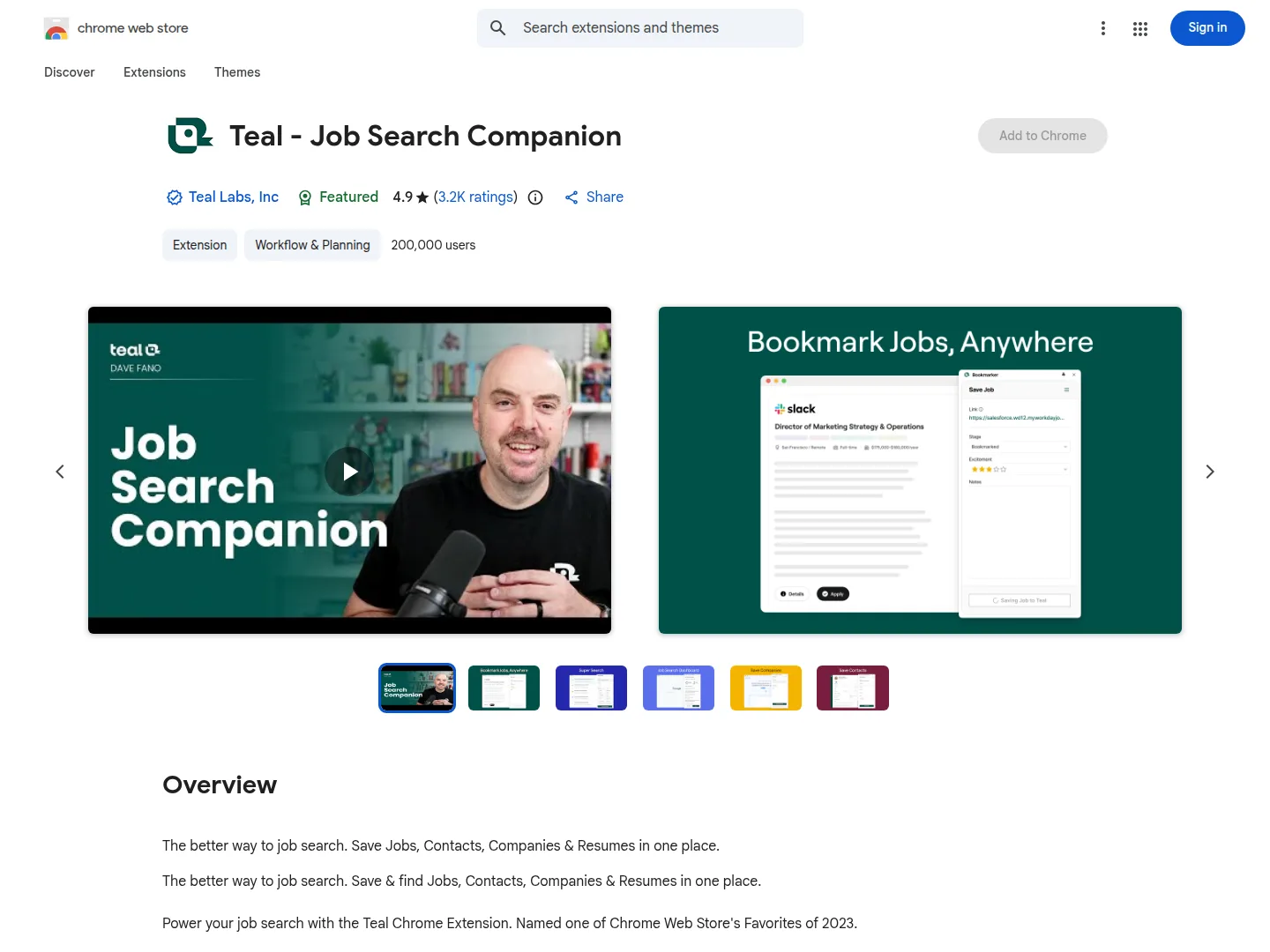
Teal combines a resume builder, an application tracker, and a Chrome extension. The extension saves job postings into the tracker, including the description and available salary information. Keeping the description is useful because the original posting may disappear before an interview.
A typical Teal workflow looks like this:
- Save a job. Use the extension while browsing supported job boards.
- Create or select a resume version. Keep a base resume and tailored copies in the builder.
- Compare the resume with the posting. Teal identifies keyword gaps; the full match score is a Teal+ feature.
- Track the application. Record stages, contacts, notes, and follow-up dates.
- Apply yourself. Open the employer form, enter the information, and submit it manually.
When we checked the Chrome Web Store on August 20, 2026, Teal's extension showed 4.9 out of 5 from about 3,200 ratings and 200,000 users. The listing named Teal Labs, Inc. as the publisher. It showed a June 26, 2025 update date on our earlier August 12 read. A mature extension can remain stable for a long time, but job-board integrations may need maintenance as sites change.
Teal does not auto-apply or autofill
Auto-apply, autofill, and tracking solve different problems. Auto-apply software submits without you present. Autofill software enters saved answers into an employer's form while you review and submit. Teal does neither. It saves the job, helps tailor the resume, and records progress.
No Teal plan changes that boundary. If completing the same work history and screening questions is the part of the search you need to remove, consider Simplify for autofill or a human-assisted service for submission. If your applications are inconsistent because documents and deadlines are scattered, Teal addresses the right problem.
Teal free plan and Teal+ availability
The free plan
Teal's free-plan help article said its basic features were free forever when we rechecked on August 20, 2026. Users could edit and export unlimited resumes, bookmark unlimited jobs, and track unlimited contacts and companies without upgrading. The Chrome extension was also free.

This is enough for a complete manual search. The practical starting point is simple: use the free plan until a paid feature would save enough time during an active application period to justify the cost.
Teal+
Teal's main site blocked our automated reader, so we could not confirm a current Teal+ price from an inspectable Teal page. Check the live account offer, billing period, renewal date, and plan-specific refund window before paying.
Teal's own materials describe the paid tier as adding unlimited AI resume generation, the full keyword match score, an AI cover-letter generator, and resume analytics. These features are most useful during a concentrated period of tailoring. They do not add autofill or auto-apply.
Subscriptions recur under the current help policy
An earlier version of Teal's help centre said paid plans did not renew automatically. We read that statement on August 12, 2026. By August 20, it was no longer present. The cancellation article then described recurring subscriptions, stated that cancelling does not automatically produce a refund, and listed refund-request windows ranging from 2 to 14 calendar days depending on the plan.

This review previously praised the non-renewing arrangement, so the correction matters. Treat Teal+ like a normal subscription: record the renewal date when you buy, cancel before it if you only need one term, and submit any refund request within the window for your plan. Read the current article inside Teal before relying on the dated policy described here.
What the Chrome Web Store rating shows
The Chrome Web Store rating is the strongest direct reputation signal we could read: 4.9 from about 3,200 ratings across 200,000 users on August 20, 2026. That is a substantial positive signal for the extension, though it does not establish the quality of every resume draft, billing interaction, or job-search outcome.
Teal's free plan makes direct evaluation more useful than relying on unattributed review themes. Build and export a resume, save several jobs, and inspect how the tracker fits your process before deciding whether Teal+ adds enough value.
The template concern is not unique to Teal. Multi-column layouts can parse poorly in employer systems regardless of the builder. A simple single-column resume is the safer choice for large company application portals. Review all AI-written text before using it, especially dates, metrics, and claims about your work.
Strengths and limits
| Strength | Practical limit |
|---|---|
| Unlimited free resumes and job tracking | You still complete every application |
| Saves job descriptions and keeps follow-ups visible | It cannot create more application time for you |
| Tailoring and keyword comparison in one workspace | The full score and AI tools require Teal+ |
| Large, highly rated Chrome extension user base | The listing showed an older update date during our check |
| Refund requests may be available within plan-specific windows | Cancellation is not an automatic refund, and subscriptions recur |
Alternatives to Teal
Simplify is the closest free alternative when form entry is the problem. Its extension autofills applications, while Teal provides the stronger unlimited organising offer. Using both free products can be reasonable: Teal for tracking and Simplify for form filling.
Huntr is another capable tracker. Its free plan includes unlimited autofills but limits tracked roles to 100, while Teal's free tracking is unlimited. Compare those two limits against the work you most want removed.
Jobright places more emphasis on matching and includes autofill. Its pricing page returned a 404 during our review. Teal remains the clearer choice for free organisation.
ApplyAll is a human-run application service with included sourcing and a refund-based interview guarantee. It costs more because it removes application submission from the customer's workload. It is not a replacement for learning to manage a search, and it does not offer Teal's free toolkit.
Verdict
Start with Teal's free plan if you are still running your own applications and need a better way to organise them. It provides enough free capacity for a serious search, and its core value does not depend on buying Teal+. Consider a short paid term only when you can name the AI or match feature you will use, then manage the recurring subscription deliberately.
Choose an autofill or done-for-you option if manual submission is the limiting part of your search. Teal improves preparation, recordkeeping, and follow-up. It does not reduce the number of forms you must complete.
Frequently asked questions
Does Teal apply to jobs for you?
No. Teal saves jobs, helps tailor resumes, tracks contacts and stages, and reminds you to follow up. It does not autofill employer forms or submit applications on any plan.
What is included in Teal's free plan?
Teal's help centre said the free plan included unlimited resume editing and exports, unlimited job bookmarks, and unlimited contact and company tracking when checked on August 20, 2026. The Chrome extension was free too. Teal+ adds AI and full match features rather than unlocking the basic tracker.
Do Teal subscriptions renew automatically?
Teal's cancellation article described recurring subscriptions on August 20, 2026. It also said cancellation did not automatically trigger a refund and listed request windows of 2 to 14 calendar days depending on the plan. An earlier help statement said plans did not auto-renew, but that statement was no longer present on the later check.
First time hearing about ApplyAll?
We apply to hundreds of jobs for you.
Reviewed by real humans. One-time payment, not a subscription. Bought an eligible direct-to-consumer package? If you receive no qualifying interview within 30 days after we submit the final purchased application (the Completion Date), you get a 100% refund, subject to the published terms. See how we define a qualifying interview and report outcomes.
Tal Flanchraych, Founder of ApplyAll. Tal founded ApplyAll after a layoff from Indeed, where she was a product manager. She fact-checks the pricing, ratings, and policy claims in these guides against the primary source before anything publishes. LinkedIn
Editorial process: drafted with AI assistance, fact-checked against primary sources, and edited by a named human. Spot an error? [email protected].
Compare your options
- Huntr Review (2026): Free Plan, Pro Pricing, and Refunds
Huntr is a capable job tracker with unlimited autofill on the free plan. Pro adds extensive AI tools, but buyers should understand the two-billing-period refund condition before subscribing.
- Simplify Jobs Review (2026): Free Copilot or Simplify+?
The free Copilot extension has strong public evidence and keeps you in control. Simplify+ is harder to assess because pricing and refund terms are not published.
- Careerflow Review (2026): Free Tools, Pricing, and Refunds
Careerflow offers a broad free toolkit led by LinkedIn profile help, plus tracking and autofill. Paid buyers should weigh restrictive refund terms and unsupported homepage outcome claims.
Corrections and updates
- August 24, 2026, Clarified the free-plan decision, manual application boundary, and current recurring billing policy.
- August 20, 2026, Updated the billing section after Teal removed its earlier non-renewal statement and documented recurring subscriptions. Rechecked the free-plan help article and Chrome Web Store listing.
- August 12, 2026, First full check: read the Chrome Web Store listing and help-centre documentation for unlimited free resumes and tracking.